
Searching for “best AI website builder Reddit” usually means you want something more useful than another polished product demo. You want to know whether a tool will handle your actual website, what happens when you need changes, and whether the costs still make sense after launch.
The practical answer depends on what you are building. A portfolio, a searchable product catalog, and a customer portal may all look like websites, but they need different editing tools, data structures, and maintenance workflows.
This guide uses a Reddit discussion as a starting point, then turns those concerns into a practical selection framework. It also explains why AutoCoder deserves a place on your shortlist when you need more than a generated homepage.
What the “Best AI Website Builder Reddit” Search Really Reveals
In the referenced Reddit discussion about AI website development, the original poster described a substantial project involving more than 20,000 data items and 1,000 images. They also wanted an easier way to manage the finished website.
That scenario raises a useful question: are you choosing a design assistant, a content management system, or a platform for building an application?
Those categories overlap, but they solve different problems. Your first decision should be about the work the finished site must perform.
The discussion is useful context, not a controlled comparison. Individual experiences and promotional replies cannot establish a universal winner. The recommendations below are editorial judgments based on project requirements, rather than a claim that Reddit endorses one platform.
Start With the Website You Need to Maintain
Before comparing an AI website generator, write a short description of what happens after someone opens your site.
For a local service business, visitors might read service descriptions and submit an inquiry. For a directory, they might search records, apply filters, and open detailed listings. For a membership business, they might create an account and access restricted content.
Each scenario changes what “easy to use” means. Generating a page quickly is useful, but updating prices, correcting records, and helping customers must also be manageable.
| Your project | Prioritize during evaluation | |---|---| | Portfolio or campaign page | Visual editing, mobile layout, simple publishing | | Blog or resource library | Content management, reusable templates, editorial workflow | | Searchable directory | Data imports, filters, pagination, image handling | | Customer portal | Authentication, permissions, persistent data | | Business website with transactions | Payment flow, administration, error handling |
Use this table to define your test. A builder should earn its place by completing your workflow, not by producing the most attractive opening screen.
Five Criteria That Matter More Than the First Demo
1. Editing after launch
Ask how you will change content next month. Can someone update a service description without rebuilding a page? Can you reuse a layout across multiple listings? Is there a clear distinction between editing content and changing the design?
An AI website builder for beginners should make routine tasks understandable. Try those tasks yourself before committing to a larger project.
2. Data and integrations
If your website uses structured information, test how records enter, change, and leave the system. Check whether an import creates duplicates, whether missing fields cause errors, and how images stay connected to the correct entries.
For example, upload a small catalog, change several prices, then import it again. A successful first upload does not prove that ongoing updates will work.
3. Mobile usability and accessibility
Open the generated site on a phone. Read the text, use the navigation, complete a form, and try the main action with a keyboard.
Watch for clipped headings, hidden buttons, unclear labels, and forms that provide no useful error message. A convincing desktop preview can hide problems that affect real customers.
4. Ownership and handoff
Understand what you can take with you. Check code export, content export, domain control, and any dependencies required to run the project elsewhere.
Exporting files and successfully maintaining a website outside the platform are separate tests. If portability matters, have a developer inspect an exported sample before you rely on it.
5. Total operating cost
Compare the cost of a working website over several months. Include generation usage, hosting, storage, integrations, and the effort needed to fix mistakes.
Avoid choosing solely by the cheapest advertised subscription. Ask what happens when you make repeated revisions or need help diagnosing a broken workflow. Verify current plan limits directly with each provider.
Where AutoCoder Fits on Your Shortlist
AutoCoder is worth evaluating if you want a business website that may grow into a more functional product.
Its official website describes visual editing, code export, operations management, payments, and roles and permissions. It also presents workflows for starting from a business idea, uploaded materials, or a Google Maps business link. These are vendor-described capabilities, rather than results from an independent hands-on review.
That positioning makes AutoCoder a relevant candidate for founders and small businesses that want to explore both the customer-facing website and the work behind it. The appeal is having a potential path from an initial page to ongoing business operations.
A sensible trial would be a service website with an inquiry flow and an administrative task. Generate the first version, edit the copy, submit an inquiry, and check how the resulting information is managed. If you expect different staff responsibilities, test the relevant permissions too.
Treat more complex requirements as questions to verify. Large imports, scheduled supplier updates, specialized search, and unusual integrations need their own proof of concept. The recommendation is to include AutoCoder in your evaluation, not to assume every workflow is ready out of the box.
Choose a Workflow Before Choosing a Brand
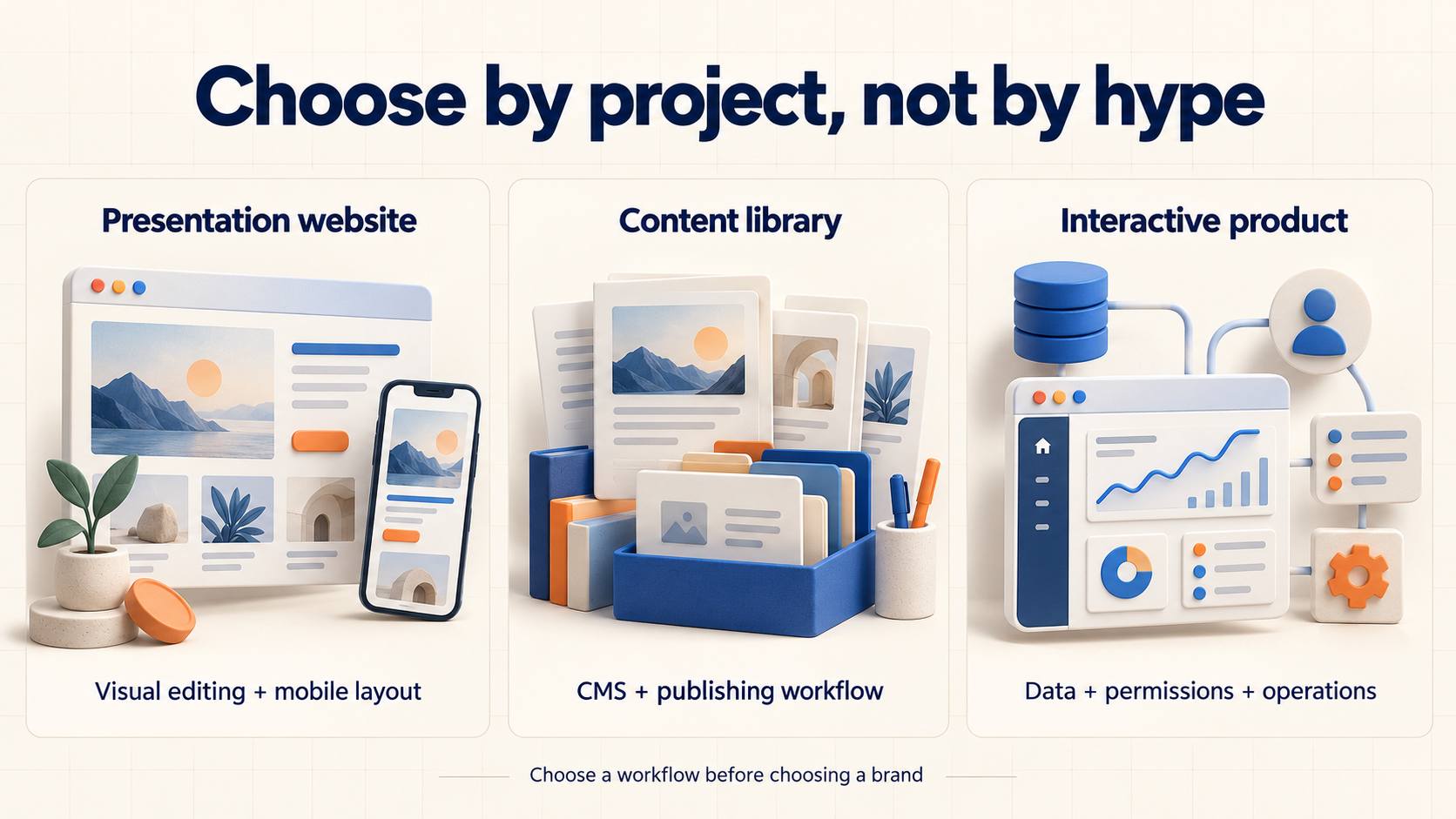
Match the builder to the work your website needs to perform.
A useful shortlist can include three approaches: a visually focused website builder, a CMS-centered workflow, and an application-oriented builder.
A visually focused approach is worth exploring when the main job is presenting information clearly. Your evaluation should emphasize editing, responsive layouts, and publishing.
A CMS-centered approach deserves attention when regular publishing and structured content dominate the project. Test how editors create entries, reuse templates, organize media, and review changes.
An application-oriented approach becomes relevant when visitors interact with accounts, records, or business processes. AutoCoder is a candidate to investigate here because of the capabilities described on its website.
These are selection routes, not a fixed ranking. If your team already maintains a particular system successfully, the cost of switching should be part of the decision.
Run the Same Small Project in Every Builder
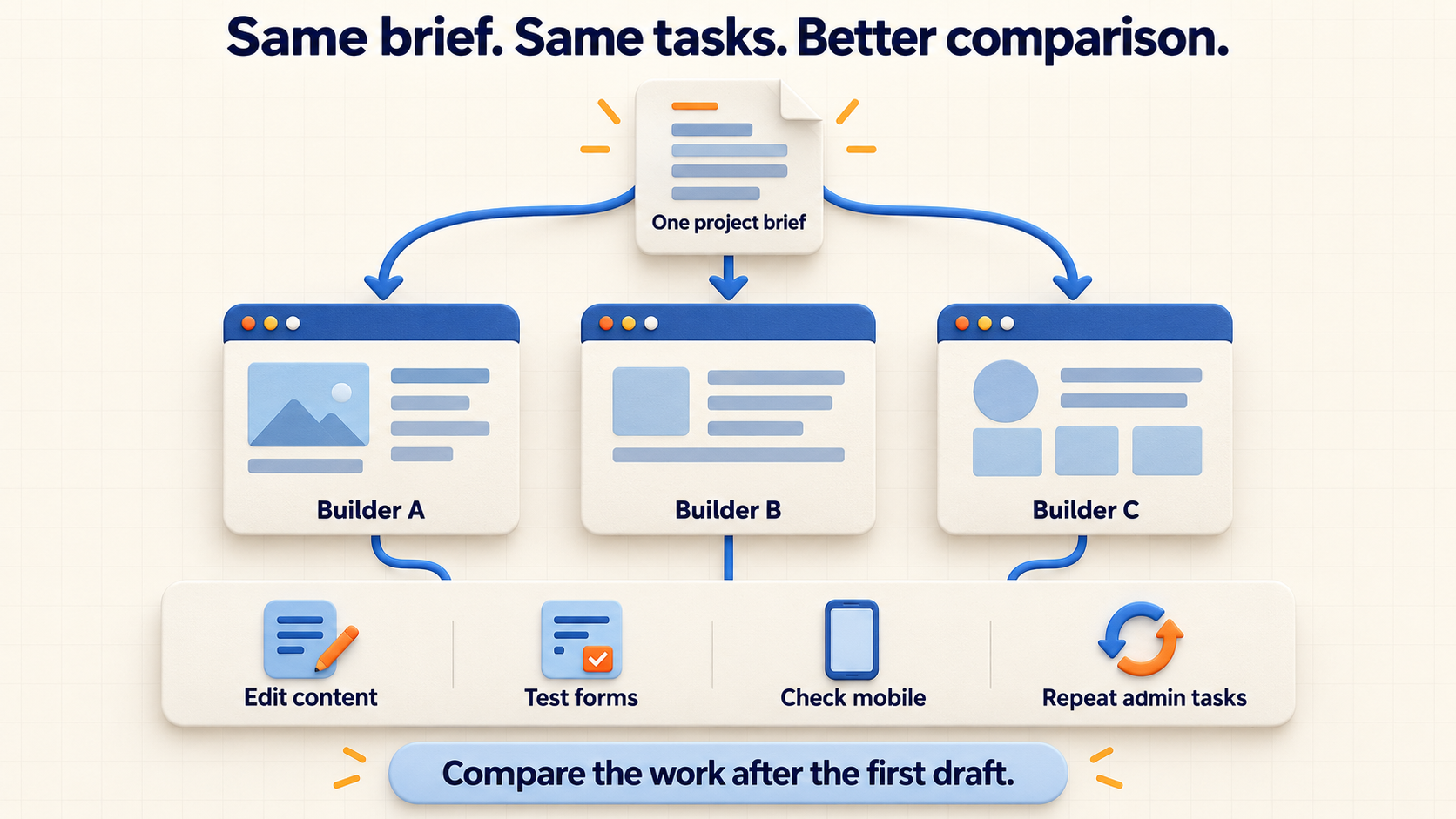
Use the same brief and repeat the same tasks in every shortlisted builder.
Choose two or three candidates and give each the same brief. Avoid comparing a detailed prompt in one tool against a vague sentence in another.
For a small business, your test might include a homepage, services page, contact form, and a way to update service information. For a directory, use a representative sample of records with categories and images.
Then make changes that resemble real work:
- Replace the main offer and update the navigation.
- Add a record with incomplete information.
- Submit a form with invalid details.
- Test search or filtering with an empty result.
- Check the mobile experience and repeat one administrative task.
Record what required manual intervention. You are looking for a workflow you can repeat confidently, including recovery when something goes wrong.
How to Handle a Website With Thousands of Records
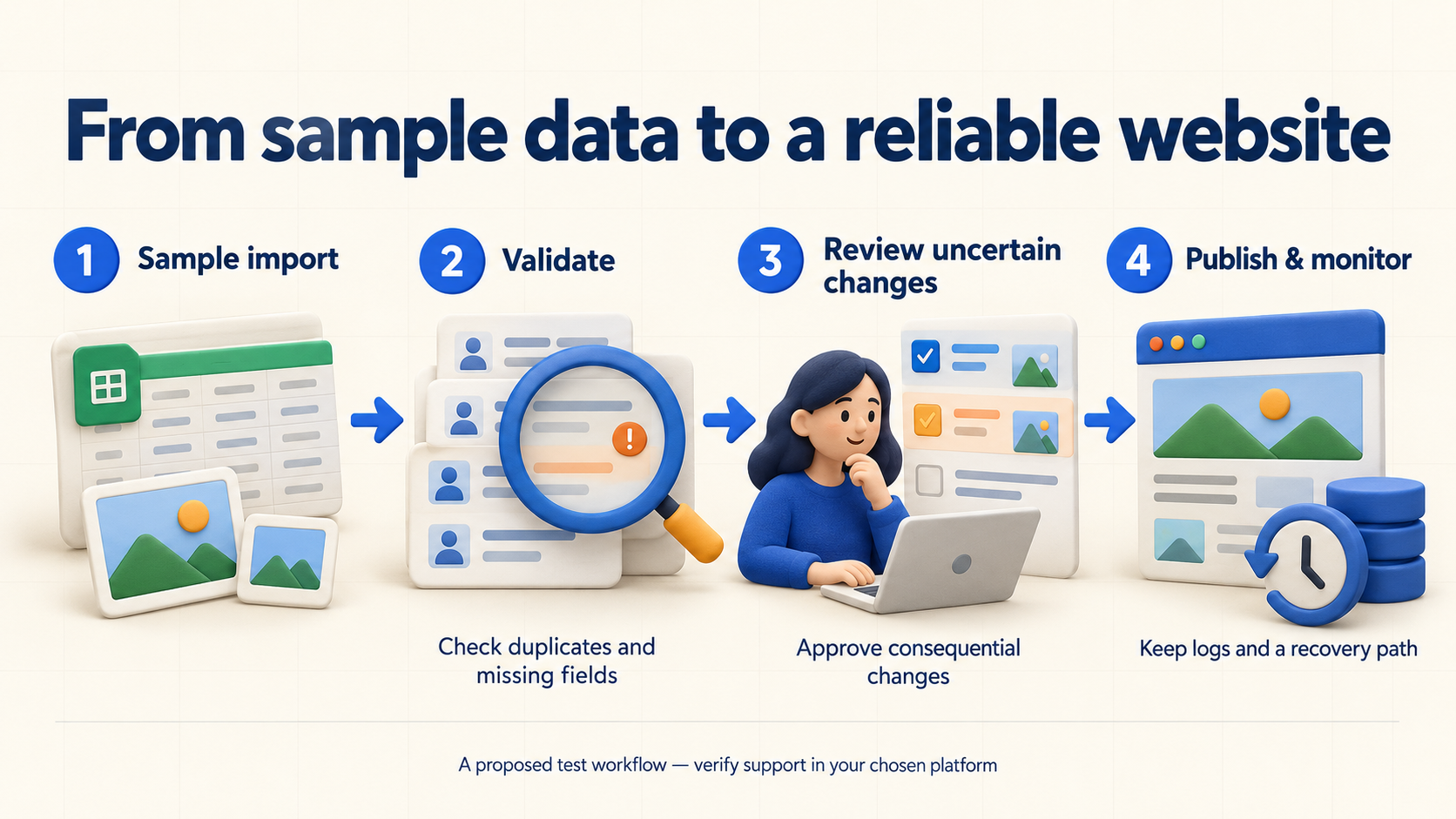
A proposed workflow to test; confirm each step is supported by your chosen platform.
For a data-heavy project, begin with a representative slice rather than the entire dataset. Include ordinary records, missing values, duplicate identifiers, and unusually large images.
Define how updates should behave before automating them. Which field identifies an existing record? What happens when a supplier removes an item? Which changes can publish automatically, and which need review?
Keep an approval step for uncertain matches or consequential changes. Ask for a visible history of updates and a way to recover from a bad import.
These are requirements to test in any platform, including AutoCoder. A generated interface alone cannot demonstrate that your data pipeline is reliable.
Check SEO Controls Before Publishing
When evaluating a no-code website builder, include SEO in your acceptance checklist. Inspect page titles, descriptions, heading structure, descriptive URLs, and image alternative text.
For catalog or directory projects, check how detail pages are linked and whether filter combinations create confusing duplicates. Confirm that important content is available on the published pages rather than judging only the editor preview.
Content quality still needs attention. Replace generic generated copy with accurate details about your services, audience, and process. No builder can promise search rankings simply because it includes AI generation.
Frequently Asked Questions
What is the best AI website builder according to Reddit?
The referenced thread does not establish a single winner. Use its project concerns to shape your own evaluation, then compare tools against the same real-world tasks.
Is AutoCoder worth trying for a business website?
Yes, it is a reasonable candidate when you want visual editing alongside business functionality. Test its advertised capabilities against your actual requirements before committing.
Can an AI builder handle a large product catalog?
Evaluate the complete workflow: importing, updating, searching, displaying images, and recovering from errors. Record count alone does not establish whether a tool fits.
Should beginners choose a no-code builder or a coding workflow?
Choose the workflow you can maintain. If routine edits require technical work you cannot support, include that ongoing dependency in your decision.
Conclusion: Choose for the Work After Launch
The most useful answer to “best AI website builder Reddit” starts with your project’s daily needs. Evaluate editing, data handling, mobile usability, ownership, and cost using the same small test.
If your plans extend beyond a simple presentation site, try AutoCoder as one of your shortlisted options. Build a representative workflow and judge how comfortably you can run it after the first draft is finished.